
SumoLogic query can also be run via API. Here is a bash example that I wrote to get the nginx access logs.
By default it searches the logs in the past 10 minutes, but you can overwrite it by adding a parameter.
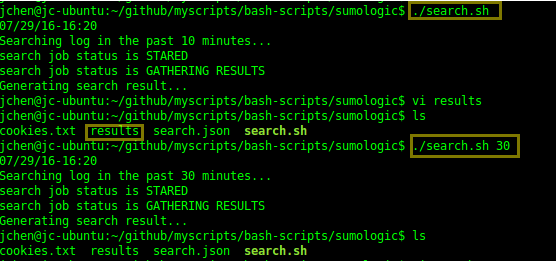
Here is the script. It is also can be found in my github.
#!/bin/bash

# Sumo credential format username:password
SUMOACCESS="username:password"

# Default 10 minutes
TIME=${1:-10}

# Wait interval in seconds
WAITFOR="10"

# Setup time range
FROM_TIME=`date  "+%Y-%m-%dT%R:%S" -d "$TIME min ago"`
TO_TIME=`date  "+%Y-%m-%dT%R:%S"`

# Check proxy
if [[ `export | grep http_proxy`  ]]; then
  echo "Found proxy"
  PROXY="-x ${http_proxy}:80"
fi

# Current time
/bin/date +%D-%R

# Generate search file
cat > search.json << EOF
{
  "query": "_sourceCategory=my-nginx-access | parse "* - - [*] \"*\" * *" as client, timestamp, request, response, size",
  "from": "${FROM_TIME}",
  "to": "${TO_TIME}",
  "timeZone": "Australia/Sydney"
}
EOF

echo "Searching log in the past $TIME minutes... "
job_id=`curl $PROXY -s -b cookies.txt -c cookies.txt -H 'Content-type: application/json' -H 'Accept: application/json' -X POST -T search.json --user $SUMOACCESS "https://api.au.sumologic.com/api/v1/search/jobs" | jq -r .id`

job_status="STARED"
while [ "${job_status}" != "DONE GATHERING RESULTS"  ]
do
  sleep $WAITFOR
  echo search job status is ${job_status}
  job_status=`curl $PROXY -s -b cookies.txt -c cookies.txt -H 'Accept: application/json' --user $SUMOACCESS https://api.au.sumologic.com/api/v1/search/jobs/${job_id}| jq -r .state`
done

echo "Generating search result..."
curl $PROXY -s -b cookies.txt -c cookies.txt -H 'Accept: application/json' --user $SUMOACCESS "https://api.au.sumologic.com/api/v1/search/jobs/${job_id}/messages?offset=0&limit=1000" -o results
 Jackie Chen's IT Workshop