
Continue with my previous post ‘Docker Infrastructure V1.1‘, I want to share some my understanding of how Kubernetes works.
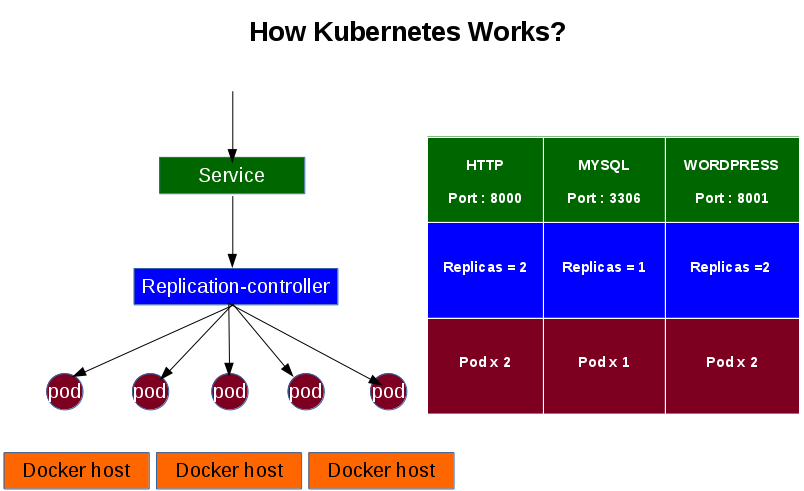
Logically, there are 3 basic components in Kubernetes. Pod, Relication-controller and Service:
- Pod: it is the smallest unit in Kubernetes. It contains one or more containers.
- Replication-controller: It controls and also guarantees the instance numbers of a pod.
- Service: it is interface that user or other applications can interact with.
If you ever used AWS ECS, it may be easy to understand the concept. Here is how I compare them.
| AWS ECS | Kubernetes |
| Task | Pod |
| Auto-scale policy | Replication-controller |
| Service | Service |
For example, I want to build up a HTTP service on Kubernetes. There are two steps:
1) Create a replication controller and set replicas size – how many pods you want to run. Here is my sample json file. It will create 2 pods within the replication-controller my-httpd-01.
{
   "kind":"ReplicationController",
   "apiVersion":"v1beta3",
   "metadata":{
      "name":"my-httpd-01",
      "labels":{
         "name":"my-httpd-01"
      }
   },
   "spec":{
      "replicas":2,
      "selector":{
         "name":"my-httpd-01",
         "version":"v1"
      },
      "template":{
         "metadata":{
            "labels":{
               "name":"my-httpd-01",
               "version":"v1"
            }
         },
         "spec":{
            "volumes":[
          {"name": "web", "hostPath": {"path": "/web"}}
      ],
            "containers":[
               {
                  "name":"my-httpd-01",
                  "image":"dockerdev02:5000/my-httpd",
          "volumeMounts":[
            {"name": "web", "mountPath": "/var/www/html"}
          ],
                  "ports":[
                     {
                        "containerPort":80,
                        "protocol":"TCP"
                     }
                  ]
               }
            ]
         }
      }
   }
}
2) Create service to use the backend replication controller that is created above, and expose the port to external world. Here is the sample json file. It creates a service named my-httpd-01 to use the replication-controller my-httpd-01 that is created above, and expose the service to port 8000. External users can access it via the defined public IP addresses.
{
   "kind":"Service",
   "apiVersion":"v1beta3",
   "metadata":{
      "name":"my-httpd-01",
      "labels":{
         "name":"my-httpd-01"
      }
   },
   "spec":{
      "ports": [
        {
          "port":8000,
          "targetPort":80,
          "protocol":"TCP"
        }
      ],
      "publicIPs":["10.1.1.11","10.1.1.12"],
      "selector":{
         "name":"my-httpd-01"
      }
   }
}
When user access the HTTP service, the traffic are load balanced by the service between the pods.
 Jackie Chen's IT Workshop