
vCO comes with many useful workflows. ‘Find orphaned virtual machines’ is a good example. It is designed for preventing the VM sprawl by finding out the orphaned virtual machines. The workflow works fine without any customizations, but I prefer to make it simpler. So I made a copy of this workflow, and named it as ‘Find out orphaned virtual machines’.

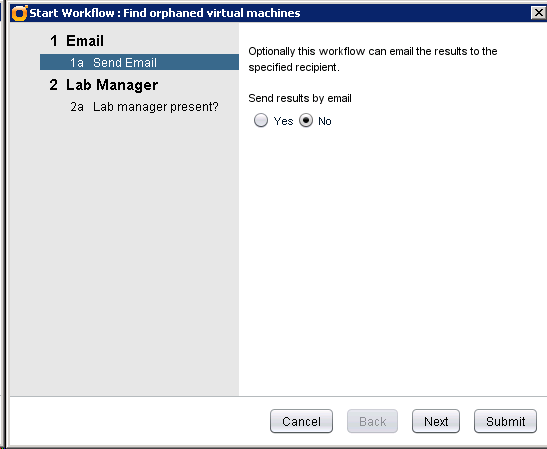
This is the original version.
Here is my version (removed the lab manager, and hard code the SMTP settings). Enter your Email address, and click Submit is all you need to do. Less is more 
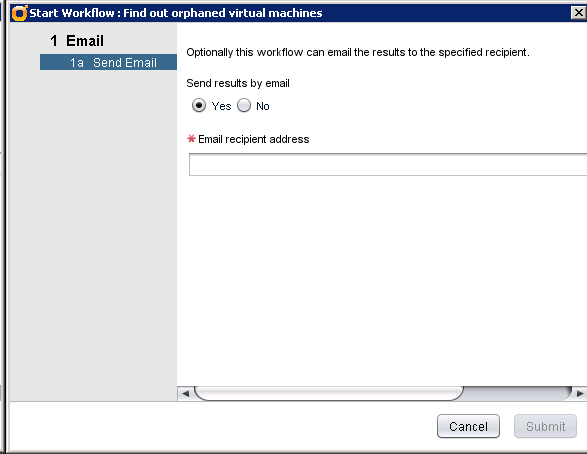

Following are the key steps:
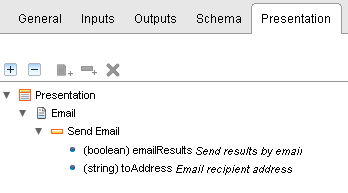
1) Change the presentation
2) Comment out the isLabManagerFould entry in the ‘Get All Unknown vmdk’ script task.
//if (isLabManagerFould(files[x]) == false)
3) Hard code the SMTP settings in the ‘Email Results’ script task.
// Override default settings if and only if input parameter is set
//if ( smtpHost != null && smtpHost.length > 0 ){
message.smtpHost = “smtp.my.lab”;
//}
//if ( smtpPort != null && smtpPort > 0 ){
message.smtpPort = “25”;
//}
//if ( username !=null && username.length > 0){
// message.username = “”;
//}
//if ( password != null && password.length > 0){
// message.password = “”;
//}
//if ( fromName != null && fromName.length > 0){
message.fromName = “Service-vCO”;
//}
//if ( fromAddress != null && fromAddress.length > 0){
message.fromAddress = Service-vCO@my.lab;
//}
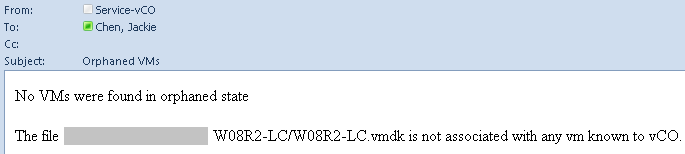
A report will be sent to the user’s Email address after completed.
 Jackie Chen's IT Workshop