
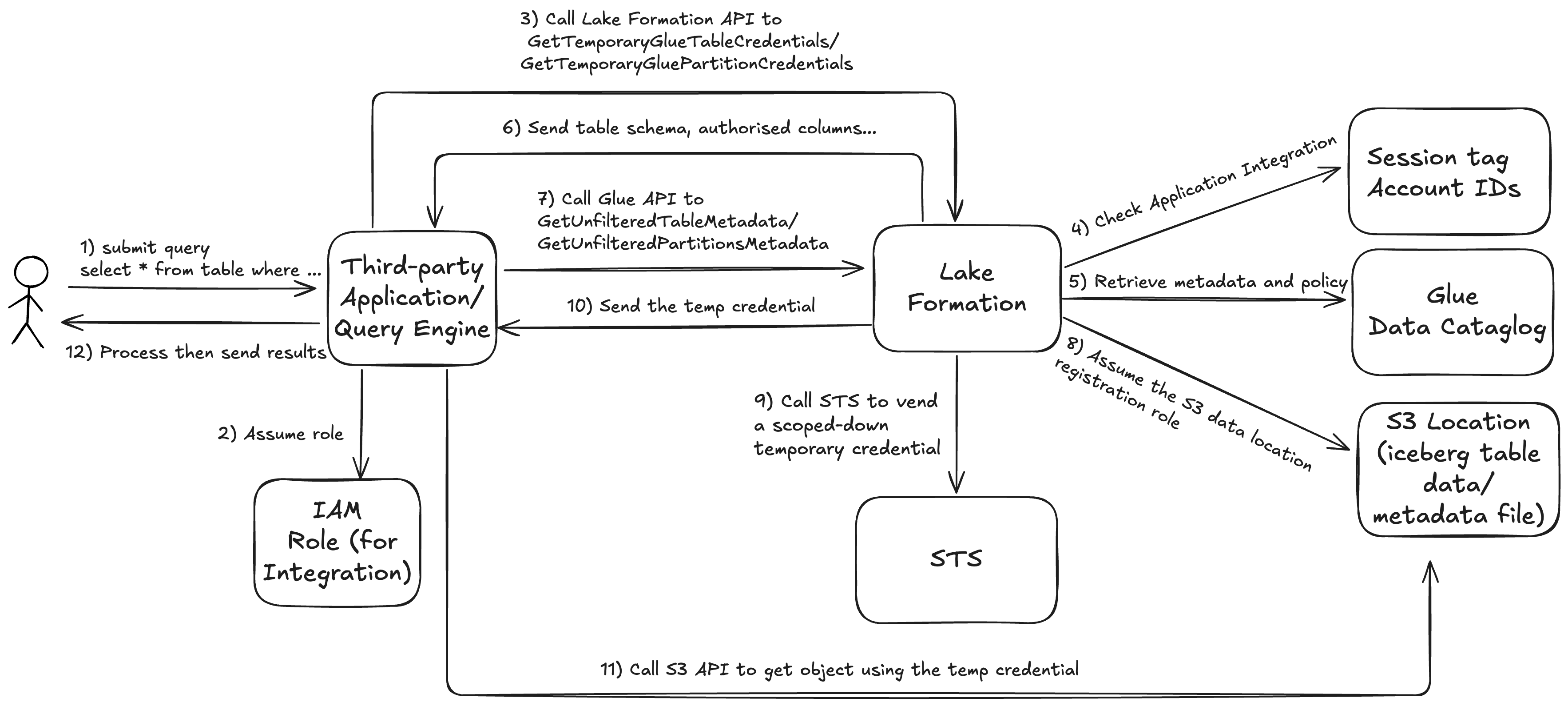
Integrating with AWS Lake Formation allows third-party services to securely access data stored in Amazon S3–based data lakes. Over the past few days, I’ve gained several valuable insights from hands-on experience that I’d like to share.
I will walk you through the end-to-end workflow illustrated above and highlight some key lessons and challenges encountered along the way.
Step 1: A user submits a query for data using the integrated third-party query engine. e.g. “select * from table where ….”.
Step 2: The query engine assumes an IAM role that represents the user. (Reference: https://docs.aws.amazon.com/lake-formation/latest/dg/register-query-engine.html)
The minimum set of permissions the role needs:
{
  "Version":"2012-10-17",
  "Statement": {"Effect": "Allow",
    "Action": [
      "lakeformation:GetDataAccess",
      "glue:GetTable",
      "glue:GetTables",
      "glue:GetDatabase",
      "glue:GetDatabases",
      "glue:CreateDatabase",
      "glue:GetUserDefinedFunction",
      "glue:GetUserDefinedFunctions",
      "glue:GetPartition",
      "glue:GetPartitions"
    ],
    "Resource": "*"
  }
}
The trust policy to allow the query engine role to assume the integration role, the sts tag session LakeFormationAuthorizedCaller is critical, it has to be the same as the one in the application integration settings in Lake Formation. If the query engine is a SaaS platform or for multiple tenants, then include ExternalId for better security. Replace the “123-456-789” and “hello_world” with yours.
{
	"Version": "2012-10-17",
	"Statement": [{
			"Effect": "Allow",
			"Principal": {
				"AWS": [
					"arn:aws:iam::111122223333:role/query-execution-role"
				]
			},
			"Action": "sts:AssumeRole",
			"Condition": {
				"StringEquals": {
					"sts:ExternalId": "123-456-789"
				}
			}
		},
		{
			"Sid": "AllowPassSessionTags",
			"Effect": "Allow",
			"Principal": {
				"AWS": [
					"arn:aws:iam::111122223333:role/query-execution-role"
				]
			},
			"Action": "sts:TagSession",
			"Condition": {
				"StringLike": {
					"aws:RequestTag/LakeFormationAuthorizedCaller": "hello_world"
				}
			}
		}
	]
}
Step 3: With the assumed integration role, the query engine calls GetUnfilteredTableMetadata, and if it is a partitioned table, the query engine calls GetUnfilteredPartitionsMetadata. (Reference: https://docs.aws.amazon.com/glue/latest/webapi/API_GetUnfilteredTableMetadata.html)
Step 4: Lake Formation performs authorisation for the request, including verifying the session tag, account ID and the integration role’s permission on the table. The integration role need “Describe” permission in Lake Formation on the table to retrieve the metadata, otherwise the request will be denied.
Step 5: Lake Formation forwards the authorised request from the query engine to Glue Data Catalog to get metadata and policy information.
As part of the request, the query engine sends the filtering it supports. There are two flags that can be sent within an array: COLUMN_PERMISSIONS and CELL_FILTER_PERMISSION. If the query engine doesn’t support any of these features, and a policy exists on the table for the feature, then a PermissionTypeMismatchException is thrown and the query fails. This is to avoid data leakage.
Step 6: Lake Formation sends the response back to the query engine. The returned response contains the following:
- The entire schema for the table so that query engines can use it to parse the data from storage.
- A list of authorized columns that the user has access. If the authorized column list is empty, it indicates that the user has DESCRIBE permissions, but does not have SELECT permissions, and the query fails.
- A flag, IsRegisteredWithLakeFormation, which indicates if Lake Formation can vend credentials to this resources data. If this returns false, then the customers’ credentials should be used to access Amazon S3.
- A list of CellFilters if any that should be applied to rows of data. This list contains columns and an expression to evaluate each row. This should only be populated if CELL_FILTER_PERMISSION is sent as part of the request and there is a data filter against the table for the calling user.
Step 7: After the metadata is retrieved, the query engine calls Lake Formation for GetTemporaryGlueTableCredentials or GetTemporaryGluePartitionCredentials.
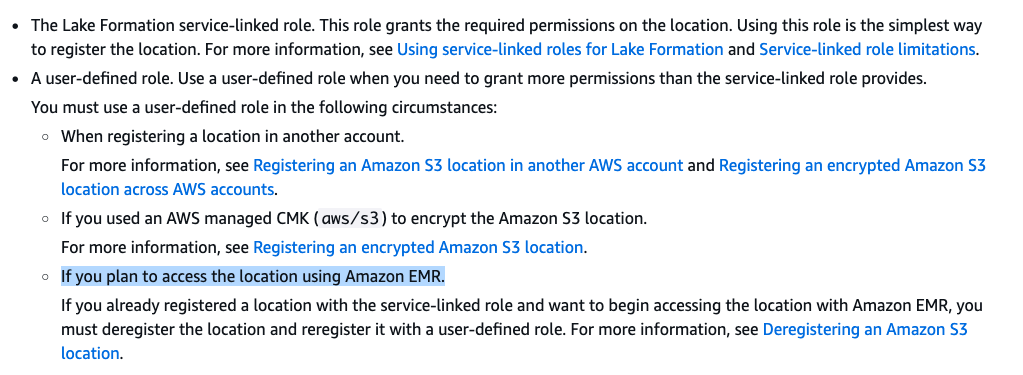
Step 8: Lake Formation assumes the role that is associated with S3 data lake location registration. A IMPORTANT lesson that I learned is that you should ALWAYS use a custom IAM role instead of Service Linked Role(SLR) for S3 location registration. If you see the errorCode:AccessDenied, errorMessage:Access is not allowed in GetDataAccess event in CloudTrail, then most likely it is due to the limitation of the service linked role.
I tested and verify it with a Python script using boto3 – When using SLR, I alway get the response: An error occurred (AccessDeniedException) when calling the GetTemporaryGlueTableCredentials operation: Access is not allowed. Even my test environment does not fall into the following list:
For the custom IAM role, the minimum sets of permission it needs. Replace <data-lake-bucket-name> with your one.
{
    "Version": "2012-10-17",
    "Statement": [
        {
            "Sid": "LakeFormationDataAccessServiceRolePolicy",
            "Effect": "Allow",
            "Action": [
                "s3:ListAllMyBuckets"
            ],
            "Resource": [
                "arn:aws:s3:::*"
            ]
        },
        		{
			"Sid": "LakeFormationDataAccessPermissionsForS3",
			"Effect": "Allow",
			"Action": [
				"s3:PutObject",
				"s3:GetObject",
				"s3:DeleteObject"
			],
			"Resource": [
				"arn:aws:s3:::<data-lake-bucket-name>/*"
			]
		},
		{
			"Sid": "LakeFormationDataAccessPermissionsForS3ListBucket",
			"Effect": "Allow",
			"Action": [
				"s3:ListBucket"
			],
			"Resource": [
				"arn:aws:s3:::<data-lake-bucket-name>"
			]
		}
    ]
}
If the <data-lake-bucket-name> bucket is encrypted with KMS CMK, then it also need the relevant KMS permissions:
{
	"Effect": "Allow",
	"Action": [
		"kms:Decrypt",
		"kms:GenerateDataKey"
	],
	"Resource": [
		"arn:aws:kms:<region>:<account-id>:key/<key-id>"
	]
}
Since the role needs to be assumed by Lake Formation, it needs the trust policy:
{
    "Version": "2012-10-17",
    "Statement": [
        {
            "Effect": "Allow",
            "Principal": {
                "Service": "lakeformation.amazonaws.com"
            },
            "Action": "sts:AssumeRole"
        }
    ]
}
Step 9: Lake Formation calls STS to get a temporary, short-lived credentials (including an access key ID, secret access key, and session token) for the query engine. These credentials are scoped down to grant only the specific access required for the authorised user and the requested data. This process is known as Credential Vending.
Step 10: Lake Formation send the scoped-down temporary credential to the query engine.
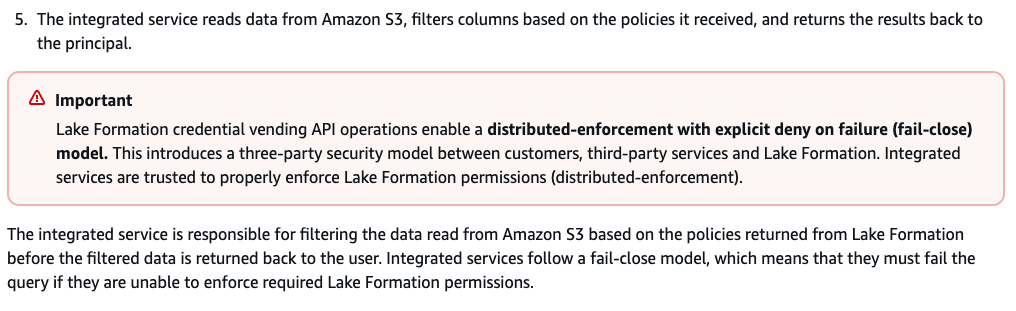
Step 11: With the temporary credential, the query engine reads relevant objects from S3, filters and data based on the policies it received in step 6 .
Step 12: The query engine processes the retrieved data then send the results back to the user. It is IMPORTANT to note that the query engine is responsible for filtering the data read from S3 based on policies returned from Lake Formation before the filtered data is returned to the user.
If you are interested to get your hands dirty, here is the how to:
First, setup the integration role in IAM, application integration and data lake location registration in Lake Formation (use above as reference).
Second, assume the integration role. Here is a sample script:
export $(printf "AWS_ACCESS_KEY_ID=%s AWS_SECRET_ACCESS_KEY=%s AWS_SESSION_TOKEN=%s" \
$(aws sts assume-role --role-arn arn:aws:iam::<account_id>:role/<integration-role-name> --role-session-name LF-integration-test --external-id <external-id> --tags Key=LakeFormationAuthorizedCaller,Value=<session-tag> --query "Credentials.[AccessKeyId,SecretAccessKey,SessionToken]" --endpoint-url https://sts.<region>.amazonaws.com --region <region> --output text))
Lastly, run the following python script (“Usage: python script.py <catalog_id> <database_name> <table_name>”)
import sys
import boto3

# Create a Glue client
glue_client = boto3.client('glue')

# Create a Lake Formation client
lakeformation_client = boto3.client('lakeformation')

if len(sys.argv) != 4:
    print("Usage: python script.py <catalog_id> <database_name> <table_name>")
    sys.exit(1)

catalog_id = sys.argv[1]
database_name = sys.argv[2]
table_name = sys.argv[3]

try:
    # Get the table from Glue
    print(f">>> Glue get_table on {table_name}")
    table_response = glue_client.get_table(
        CatalogId=catalog_id,
        DatabaseName=database_name,
        Name=table_name,
    )
    print(table_response)
except Exception as e:
    print(e);

try:
    # Get unfiltered table metadata
    print("")
    print(f">> Glue get_unfiltered_table_metadata on ${table_name}")
    metadata_response = glue_client.get_unfiltered_table_metadata(
        CatalogId=catalog_id,
        DatabaseName=database_name,
        Name=table_name,
        SupportedPermissionTypes=[
            "CELL_FILTER_PERMISSION"
        ]
    )
    print(metadata_response)
except Exception as e:
    print(e);

try:
    # Get temporary credentials for the table
    print("")
    print(f">> Lake Formation get_temporary_glue_table_credentials on arn:aws:glue:{boto3.Session().region_name}:{catalog_id}:table/{database_name}/{table_name}")
    credentials_response = lakeformation_client.get_temporary_glue_table_credentials(
        TableArn=f"arn:aws:glue:{boto3.Session().region_name}:{catalog_id}:table/{database_name}/{table_name}",
        SupportedPermissionTypes=[
            "CELL_FILTER_PERMISSION"
        ],
        Permissions=["SELECT"],
    )
    print(credentials_response)
except Exception as e:
print(e) Jackie Chen's IT Workshop