
Before introducing how to use AWS EFS for Kubernetes, let me recap some terms of Persistent Volumes.
- PV (Persistent Volume): PV is a piece of storage, it can be NFS, iSCSI, EBS, EFS… The purpose of having PV is to decouple the storage from pod’s lifecycle.
- PVC (Persistent Volume Claim): PVC provides the method for pods to use PV, it includes the request storage size and access mode. If the PV supports ReadWriteMany access mode, then its PVC can be used by multiple pods.
- Storage Class: This is the abstract layer of PV which hides the implementation of PV from end users.
With the above 3 points in your mind, lets have a look the architecture.
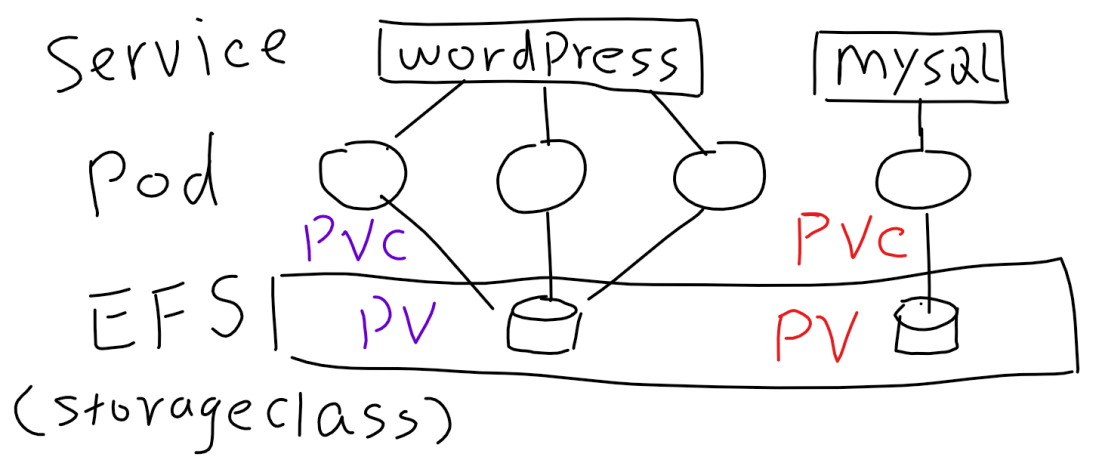
Basically, there are four steps:
-
- Create EFS (only the first time): It includes the tasks: create the EFS in the right subnets, setup the security groups to allow Kubernetes nodes to access and enable DNS support/resolution in your VPC.
- Create StorageClass for EFS via efs-provisioner (only the first time). efs-provisioner runs as a container which plays the role of EFS broker. It allows other pods to mount EFS as the persistent volumes. Just be aware of that EFS is built on top of NFS4, so you need to have nfs-common packages installed in your Kubernetes nodes
- Create a PVC to use the StorageClass for EFS. Just note that EFS has unlimited storage, so the storage size request actually does not take any effects here. But you still have to keep it to pass the syntax check.
- Create a volume for the PVC, then mount the volume inside the pod.
Here is how the PVC and PV look. And I also attached the sample code as below.

---
kind: StorageClass
apiVersion: storage.k8s.io/v1
metadata:
  name: aws-efs
provisioner: example.com/aws-efs
---
apiVersion: v1
kind: ConfigMap
metadata:
  name: wordpress
data:
  database: wordpress-db
  password: ************
---
apiVersion: v1
kind: Service
metadata:
  name: wordpress
  labels:
    app: wordpress
spec:
  ports:
  - port: 80
  selector:
    app: wordpress
---
kind: PersistentVolumeClaim
apiVersion: v1
metadata:
  name: efs-wordpress
  annotations:
    volume.beta.kubernetes.io/storage-class: "aws-efs"
spec:
  accessModes:
  - ReadWriteMany
  resources:
    requests:
      storage: 1Gi
---
apiVersion: extensions/v1beta1
kind: Deployment
metadata:
  name: wordpress
  labels:
    app: wordpress
spec:
  replicas: 2
  strategy:
    type: Recreate
  template:
    metadata:
      labels:
        app: wordpress
    spec:
      containers:
      - image: wordpress:latest
        name: wordpress
        env:
        - name: WORDPRESS_DB_HOST
          valueFrom:
            configMapKeyRef:
             name: wordpress
             key: database
        - name: WORDPRESS_DB_PASSWORD
          valueFrom:
            configMapKeyRef:
              name: wordpress
              key: password
        ports:
        - containerPort: 80
          name: wordpress
        volumeMounts:
        - name: wordpress-pv
          mountPath: /var/www/html
      volumes:
      - name: wordpress-pv
        persistentVolumeClaim:
          claimName: efs-wordpress
---
 Jackie Chen's IT Workshop
Great article – simple and clear. Thank you!