
Privacy Policy
Last updated: March 23, 2026
PHC (“Personal Health Companion”, “we”, “our”, or “the app”) is developed by Jackie Chen. This privacy policy explains how we collect, use, and protect your information.
Information We Collect
Apple Health Data. With your permission, PHC reads health metrics from Apple Health including steps, sleep, heart rate, workouts, and other metrics you enable. PHC also writes nutrition data (dietary calories, water intake, and alcohol consumption) back to Apple Health. This data is processed locally on your device and used solely to display your health dashboard and generate insights.
Account Information. When you sign in with Apple, we receive a unique identifier and, optionally, your email address (which Apple may anonymize via Private Relay). We use this solely for authentication.
User-Created Content. Food log entries, water entries, drink entries, books, and reading sessions you create are stored in our cloud database (hosted by Supabase) to enable syncing between your iPhone and Apple Watch. Each record is associated with your user account and protected by row-level security.
Food Photos. When you use the AI food analysis feature, your meal photo is sent to our server for calorie estimation. Photos are processed in real-time and are not stored on our servers after analysis is complete.
AI Insights. When you request weekly insights, aggregated health data (not raw HealthKit samples) is sent to our server for AI analysis. This data is not stored after the insight is generated.
How We Use Your Information
- To display your health metrics on the dashboard
- To sync your data between iPhone and Apple Watch
- To analyze food photos and estimate calories
- To generate personalized weekly health insights
- To authenticate your account
Data Storage and Security
Your data is stored in a secure cloud database with row-level security (RLS) policies that ensure only you can access your own data. Authentication is handled through Sign in with Apple. All data is transmitted over HTTPS.
Data Sharing
We do not sell, rent, or share your personal data with third parties. Your data is only processed by:
- Supabase — cloud database hosting (data storage and authentication)
- Anthropic (Claude) — AI processing for food analysis and health insights (data is not retained after processing)
Data Retention
Your data is retained as long as your account is active. You can delete individual entries at any time within the app. To delete your entire account and all associated data, please contact us.
Your Rights
You have the right to:
- Access your personal data
- Delete individual entries or your entire account
- Revoke Apple Health permissions at any time via iOS Settings
- Sign out and remove local data from your device
Children’s Privacy
PHC is not directed at children under 13. We do not knowingly collect personal information from children.
Changes to This Policy
We may update this privacy policy from time to time. Changes will be posted on this page with an updated date.
Terms of Use
Last updated: 24 March 2026
By using PHC, you agree to these terms.
1. Service
PHC is a personal health tracking app. AI-powered features provide estimates only and are not medical advice. Always consult a healthcare professional for medical decisions.
2. Subscriptions
PHC Pro is available as a monthly auto-renewable subscription at $4.99 AUD/month. Payment is charged to your Apple ID at confirmation of purchase. Subscriptions auto-renew unless cancelled at least 24 hours before the end of the current period. Manage or cancel anytime in your Apple ID settings.
3. Your Data
Your health data is stored securely via Supabase with row-level security. We do not sell or share your personal data. Food photos are processed by AI for calorie estimation and are not stored. See our Privacy Policy for details.
4. AI Disclaimer
Calorie estimates and health insights are generated by AI and may not be accurate. They are for informational purposes only and should not replace professional medical or nutritional advice.
5. Acceptable Use
You agree not to misuse the service, reverse engineer the app, or use it for any unlawful purpose.
6. Limitation of Liability
PHC is provided “as is” without warranties. We are not liable for any health decisions made based on information provided by the app.
7. Changes
We may update these terms at any time. Continued use of the app constitutes acceptance of the updated terms.
Manual
PHC is your all-in-one health tracking app for iPhone, iPad, and Apple Watch. It brings together your activity, sleep, heart health, nutrition, reading habits, and more — all in one place, powered by Apple HealthKit and AI.
Getting Started
When you first open PHC, you’ll be guided through a quick onboarding:
- Sign in with Apple — your data is securely tied to your Apple ID
- Grant HealthKit access — PHC reads your health data to display metrics
- Choose your metrics — pick which health metrics appear on your dashboard
- Set your goals — configure daily targets for steps, calories, sleep, and more
Dashboard
The Dashboard is your home screen — a grid of metric tiles showing today’s health data at a glance.
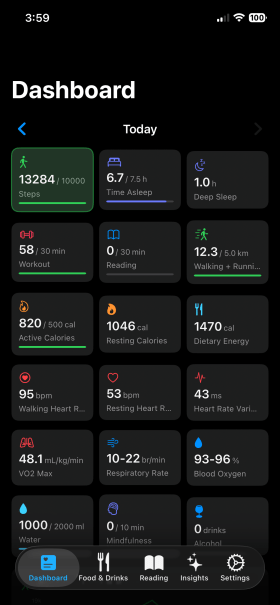
Each tile displays:
- Icon and color for the metric category
- Current value and unit
- Progress bar toward your daily goal (green when complete)
- Goal target shown next to the value
Tap the left/right arrows to view past days.
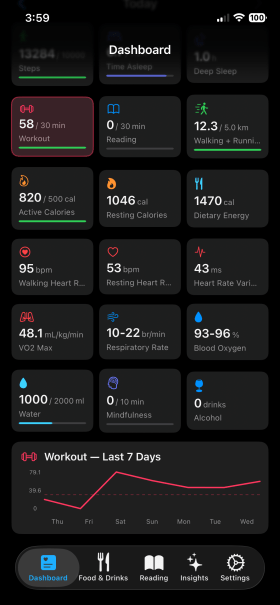
Sparkline Charts
Scroll down to see 7-day sparkline charts for each metric. These show your trends over the past week with a dashed line indicating your goal.
Customizing the Dashboard
You can customize your dashboard in Settings:
- Add or remove metrics — toggle which metrics appear
- Reorder tiles — long-press and drag tiles to rearrange them
- Change columns — switch between 2 or 3 column layouts
Food & Drinks
The Food & Drinks tab lets you log meals, track water intake, and record alcoholic drinks.
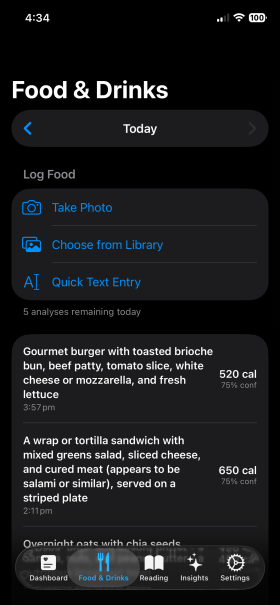
Logging Food
PHC offers three ways to log food:
- Take Photo — snap a photo of your meal and AI will analyze it
- Choose from Library — select an existing photo from your camera roll
- Quick Text Entry — describe your meal in text for AI analysis
The AI analyzes your food and provides a detailed calorie breakdown with confidence level.
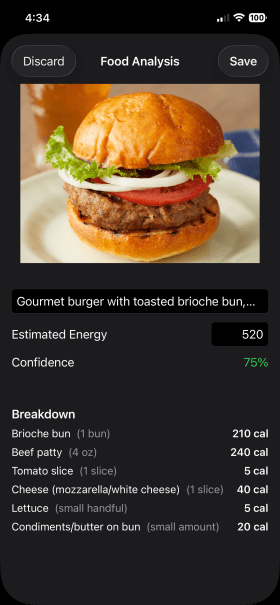
Each analysis shows:
- Description of the detected food
- Estimated total energy (editable)
- Confidence level — how certain the AI is about the estimate
- Breakdown — individual calorie counts per ingredient
You get 10 food analyses per day. Review the result and tap Save to log it, or Discard to try again.
Water Tracking
Scroll down in the Food & Drinks tab to find the Water section.
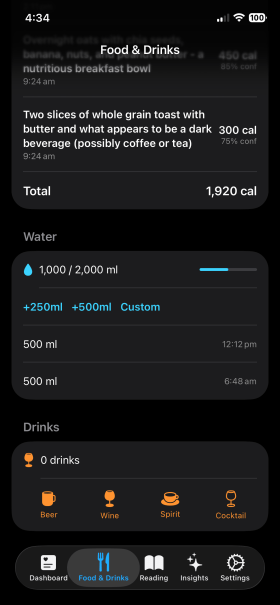
- Quick-add buttons: +250ml, +500ml, or Custom amount
- Progress bar shows how much of your daily goal you’ve reached
- Individual entries show timestamps
Water reminders: Enable in Settings > Notifications to get gentle nudges at 12pm and 3pm if you’re behind on your water goal.
Drink Tracking
Log alcoholic beverages by tapping the drink type buttons:
- Beer, Wine, Spirit, or Cocktail
Your daily drink count is displayed at the top.
Past Day Logging
Use the date arrows at the top to navigate to a past day and log food, water, or drinks retroactively.
Reading
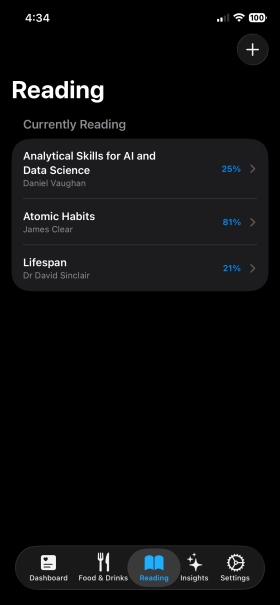
The Reading tab helps you track your books and reading sessions.
Managing Books
- Tap + to add a new book manually or scan the ISBN barcode for automatic lookup
- Each book shows the title, author, and your reading progress as a percentage
- Tap a book to log reading sessions or update progress
Logging Reading Time
Tap a book and use quick-log buttons to record reading sessions:
- +15 min, +30 min, +60 min, or Custom duration
Sessions are grouped by month with collapsible sections showing total reading time.
Insights
The Insights tab uses AI to generate a personalized weekly health summary based on your data.
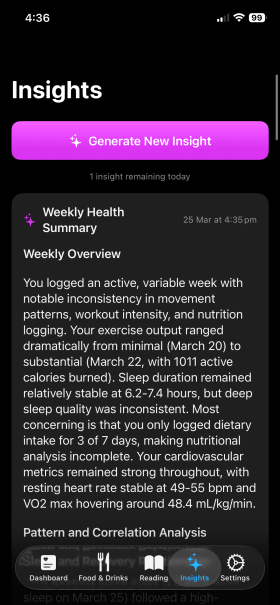
Tap Generate New Insight to create a new analysis. You can generate up to 2 insights per day.
Each insight includes:
- Weekly Overview — summary of your activity patterns, sleep quality, and nutrition
- Pattern and Correlation Analysis — connections between your metrics
- Actionable Recommendations — prioritized suggestions to improve your health
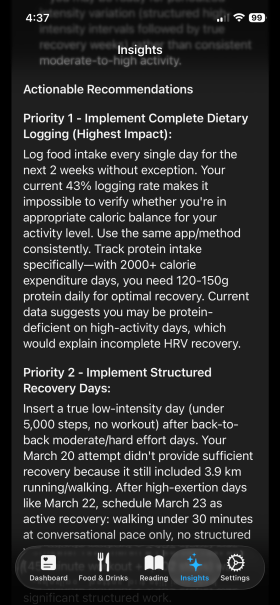
The AI considers your daily goals when generating recommendations, making them personalized to your targets.
Tips
- Long-press on insight text to select and copy specific sections
- Tap any insight to expand or collapse it
- Insights are cached locally so you can review past analyses
Settings
The Settings tab is where you configure PHC to work the way you want.
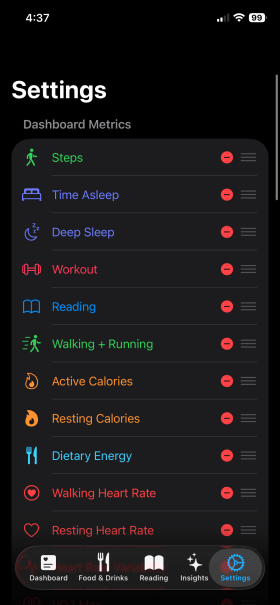
Dashboard Metrics
Toggle which metrics appear on your dashboard. Available categories include:
- Activity: Steps, Active Calories, Walking + Running Distance
- Sleep: Time Asleep, Deep Sleep
- Exercise: Workout
- Heart: Resting Heart Rate, Walking Heart Rate, HRV, VO2 Max, Cardio Recovery
- Respiratory: Blood Oxygen, Respiratory Rate
- Mental Wellbeing: Mindfulness, Reflect
- Nutrition: Dietary Energy
- From PHC: Reading, Alcohol
Use the drag handles to reorder metrics on your dashboard.
Daily Goals
Set personalized daily targets for each metric.
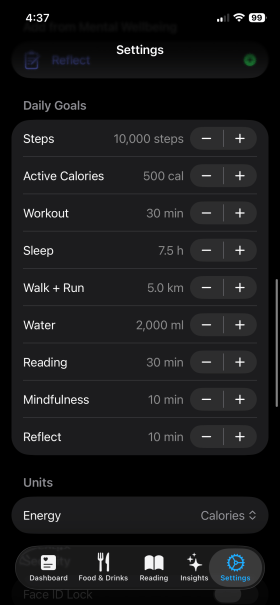
Use the – and + buttons to adjust goals for:
- Steps, Active Calories, Workout, Sleep, Walk + Run distance
- Water, Reading, Mindfulness, Reflect
Goals are shown on dashboard tiles and sparkline charts, and are included in AI insight analysis.
Other Settings
- Units — switch between Calories and Kilojoules
- Appearance — System, Light, or Dark mode
- Dashboard Columns — 2 or 3 column layout
- Notifications — water reminder toggle
- Security — Face ID / Touch ID lock with 5-minute grace period
- Subscription — manage your PHC Pro subscription
- Health Data — view and manage synced health data
Apple Watch
PHC includes a companion watch app that mirrors your dashboard tiles. It syncs your metric selections and goals from your iPhone automatically.
The watch app refreshes data when you raise your wrist or bring the app to the foreground.
Privacy & Security
- Sign in with Apple — no passwords to manage
- Face ID / Touch ID — optional biometric lock to protect your health data (5-minute grace period so you won’t be re-prompted immediately)
- All data synced via Supabase with per-user row-level security
- Health data stays in Apple HealthKit on your device
- AI analysis is processed securely — photos are not stored on any server
Subscription
PHC Pro unlocks all features including AI food analysis and weekly insights.
- Monthly: $4.99 AUD/month
- Annual: $49.99 AUD/year
- Free trial: 7 days free to try all features
Manage your subscription anytime in Settings or through your Apple ID settings.
Tips & Tricks
- Swipe left on food, water, or drink entries to delete them
- Long-press insight text to select and copy specific passages
- Scan ISBN barcodes to quickly add books with auto-filled details
- Check sparklines to spot trends — a dashed line shows your goal
- Log food consistently for more accurate AI insights
- Set realistic goals and adjust them as your habits improve
Contact
support@jackiechen.org

