Helm is the package manager for Kubernetes, you can think it as yum/apt/homebrew. It contains two parts: Server (tiller) and Client (helm). helm client can be installed on Linux/Mac/Windows, the package can be found here. Helm manages the Kubernetes charts which are pre-configured Kubernetes resources. In the following example, I will show you how to … Continue reading Use helm in Kubernetes
Author: Jackie Chen
Use AWS EFS for Kubernetes
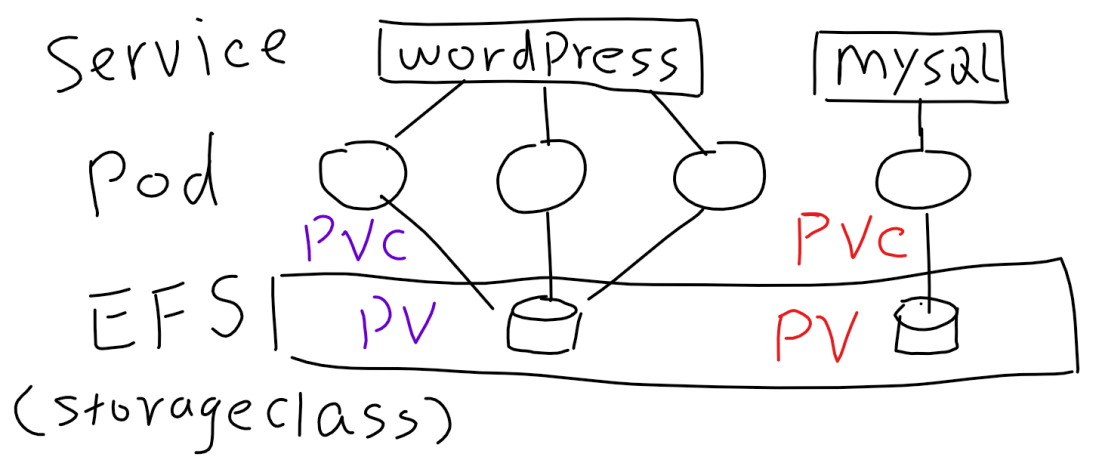
Before introducing how to use AWS EFS for Kubernetes, let me recap some terms of Persistent Volumes. PV (Persistent Volume): PV is a piece of storage, it can be NFS, iSCSI, EBS, EFS... The purpose of having PV is to decouple the storage from pod's lifecycle. PVC (Persistent Volume Claim): PVC provides the method for … Continue reading Use AWS EFS for Kubernetes
Understanding Ingress in Kubernetes
Simply speaking ingress is a collection of routing rules, and ingress controller is the component that implements those rules in Kubernetes cluster. It is not available in any Kubernetes releases prior to 1.1. I guess it is the reason that why OpenShift developed Router. This is a not so nice diagram, but I think it … Continue reading Understanding Ingress in Kubernetes
High Availability in Kubernetes cluster built by kops
In my previous post, I have shown you how to create a Kubernetes cluster on AWS with kops. And this article I will dig deeper in to the Kubernetes HA (High-Availability) that is built by kops. Here is a diagram that shows you the high level HA design of the cluster that I built. Here … Continue reading High Availability in Kubernetes cluster built by kops
Install Kubernetes on AWS with kops
It was year 2015 when I first time installed Kubernetes. Back then, installing Kubernetes is not a simple task like what it is Today. Nowadays, there are a few handy tools that you can choose, eg. kops, heptio. Additionally, you can also choose managed Kubernetes, e.g GKE, AKS, EKS and more. I recently used kops … Continue reading Install Kubernetes on AWS with kops